Writing Architecture & patterns
Architecture Patterns Every Developer Should Know, Part 3: Senior
This is Part 3 of 3: Part 1: Junior · Part 2: Middle · Part 3: Senior
In Part 1 we covered how a single application is structured, and in Part 2 how systems connect and protect themselves. At the senior level, knowing a pattern isn’t enough. Every pattern here solves a real problem and introduces a new one, and the job is judging whether the trade is worth it for your system, your team and your scale.
This final part covers migrating legacy systems (strangler fig, anti-corruption layer), distributed data (saga, event sourcing, sharding, replication), infrastructure patterns (backend for frontend, sidecar, service discovery), and the two most senior skills of all: knowing when not to use a pattern, and evolving an architecture step by step.
In this part
- Strangler Fig
- Saga
- Event Sourcing
- Anti-Corruption Layer
- Backend for Frontend
- Sidecar
- Service Discovery
- Sharding
- Replication vs Sharding
- When NOT to use a pattern
- Evolution paths
1. Strangler Fig
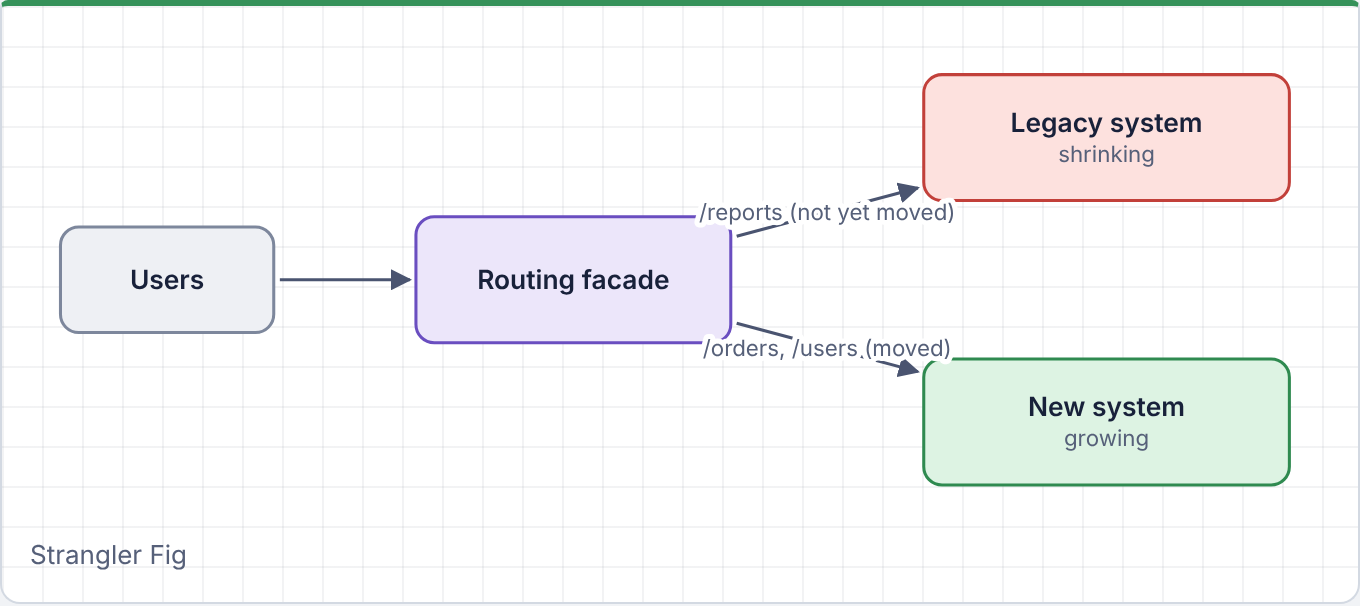
Replace a legacy system gradually, one piece at a time, behind a router.
How it works
Put a facade or proxy in front of the old system. Rebuild one feature in the new system and route that feature’s traffic there. Repeat until the legacy system handles nothing and can be switched off. No risky big-bang rewrite.
Think of it like
A strangler fig vine grows around an old tree until the tree is gone and the vine stands on its own.
Use it when
Modernizing legacy apps while the business keeps running.
Watch out for
Migrations can stall halfway, leaving you running two systems indefinitely.
2. Saga
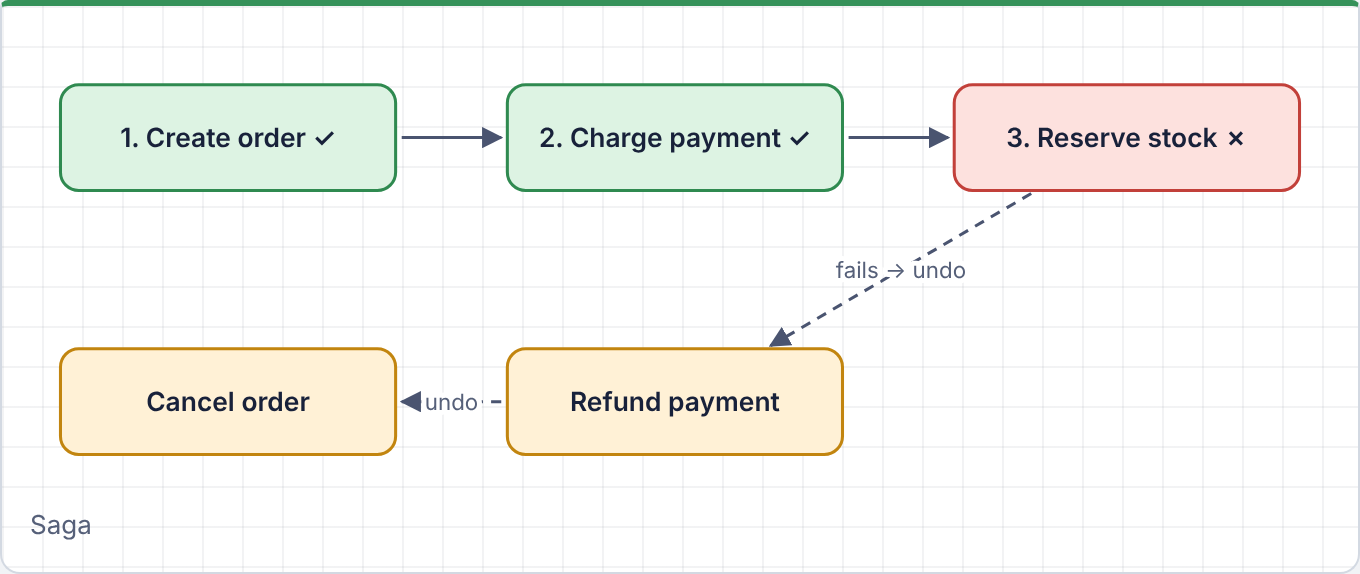
Coordinate a business transaction across several services with steps and undo steps.
How it works
There’s no single database transaction spanning services, so a saga runs local steps in order: create order, charge payment, reserve stock. If a step fails, it runs compensating actions for the steps that already succeeded: refund the payment, cancel the order. It can be choreographed (services react to events) or orchestrated (a coordinator gives orders).
Think of it like
Booking a trip: if the hotel turns out to be full, you cancel the flight you already booked.
Use it when
Multi-service workflows that must end up consistent.
Watch out for
Compensations are hard to design, and in-between states are visible to users.
3. Event Sourcing
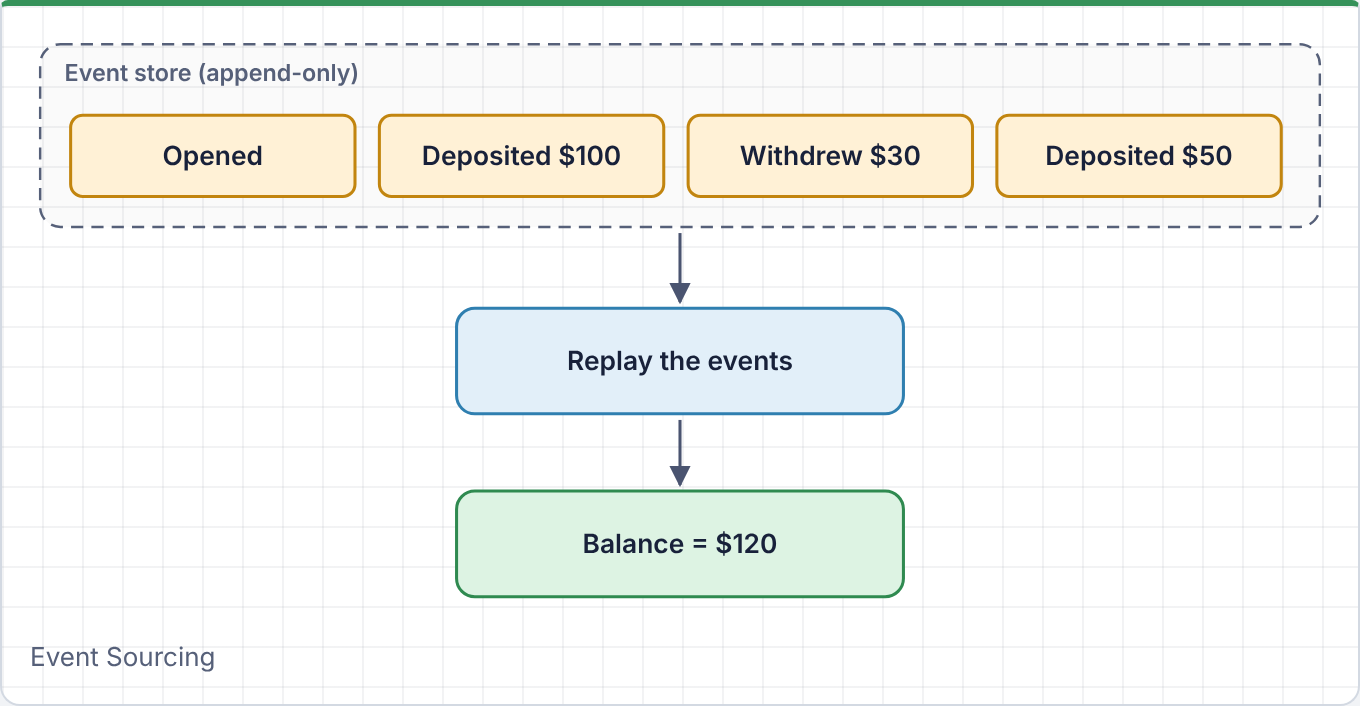
Store every change as an event and rebuild the current state by replaying them.
How it works
Instead of saving only the latest state (balance = $120), you append immutable events: account opened, deposited $100, withdrew $30, deposited $50. The current state is calculated by replaying those events. You get a complete audit history and can build new views of old data at any time.
Think of it like
A bank statement: your balance is just the sum of every transaction.
Use it when
Domains where history matters: finance, auditing, complex workflows. Often combined with CQRS.
Watch out for
Steep learning curve, versioning old event formats, and needing snapshots and projections for speed.
4. Anti-Corruption Layer
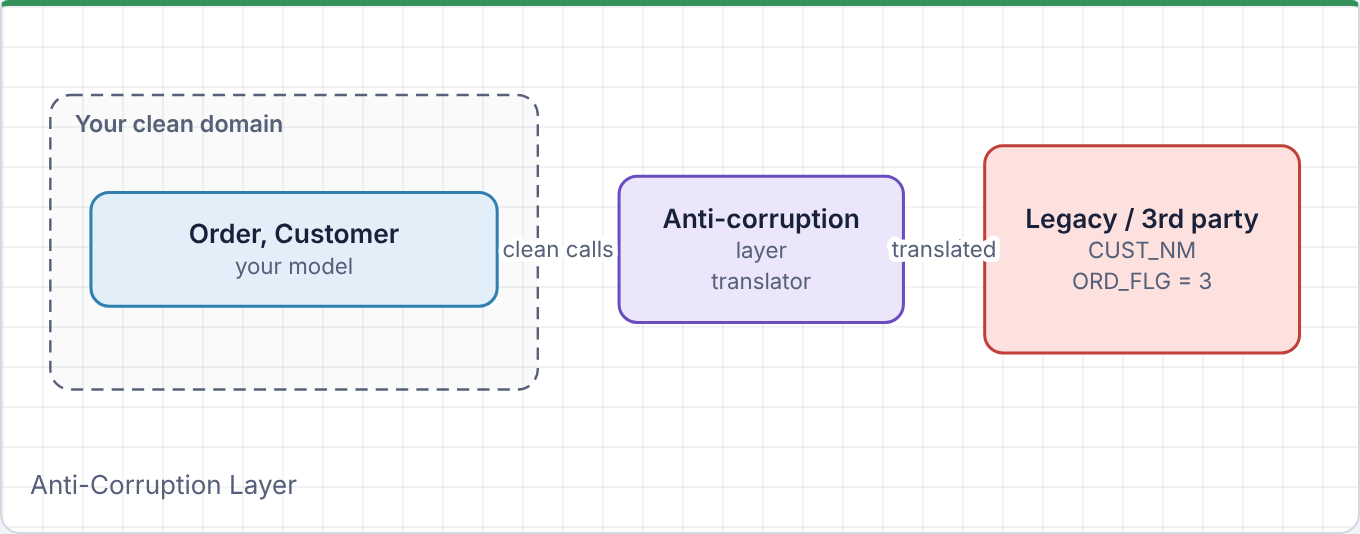
A translation layer that stops an outside model from leaking into your design.
How it works
When you integrate with a legacy or third-party system whose model is messy (fields like CUST_NM or ORD_FLG = 3), you put an adapter in between. It translates their concepts into yours and back, so your domain stays clean and any change on their side is contained in one place.
Think of it like
An interpreter between two people who speak different languages.
Use it when
Integrating with legacy systems or external APIs, and during strangler-fig migrations.
Watch out for
More code to maintain and an extra hop on every call.
5. Backend for Frontend
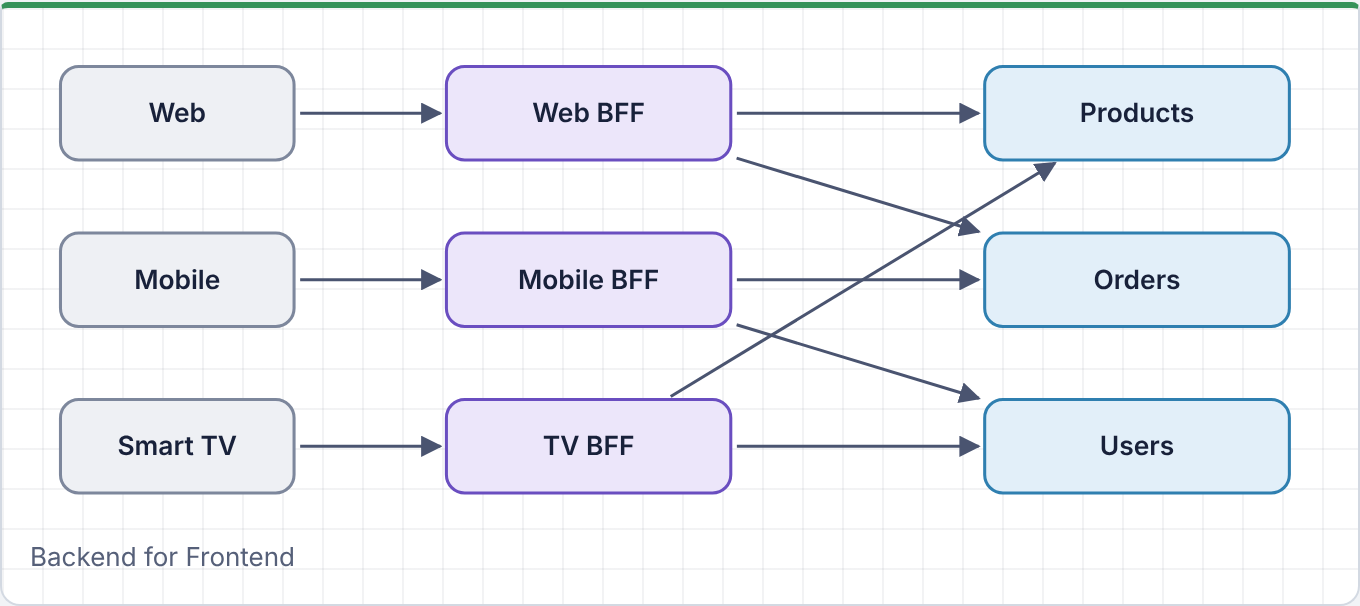
A separate small backend tailored to each kind of frontend.
How it works
A web app, a mobile app and a TV app need different amounts and shapes of data. Instead of one generic API, each frontend gets its own thin backend that calls the core services and combines and formats the results exactly as that client needs. Usually owned by the frontend team.
Think of it like
A personal assistant for each executive who prepares exactly the briefing that person wants.
Use it when
Several clients with very different needs, or separate frontend teams.
Watch out for
Duplicated logic across BFFs and more services to deploy.
6. Sidecar
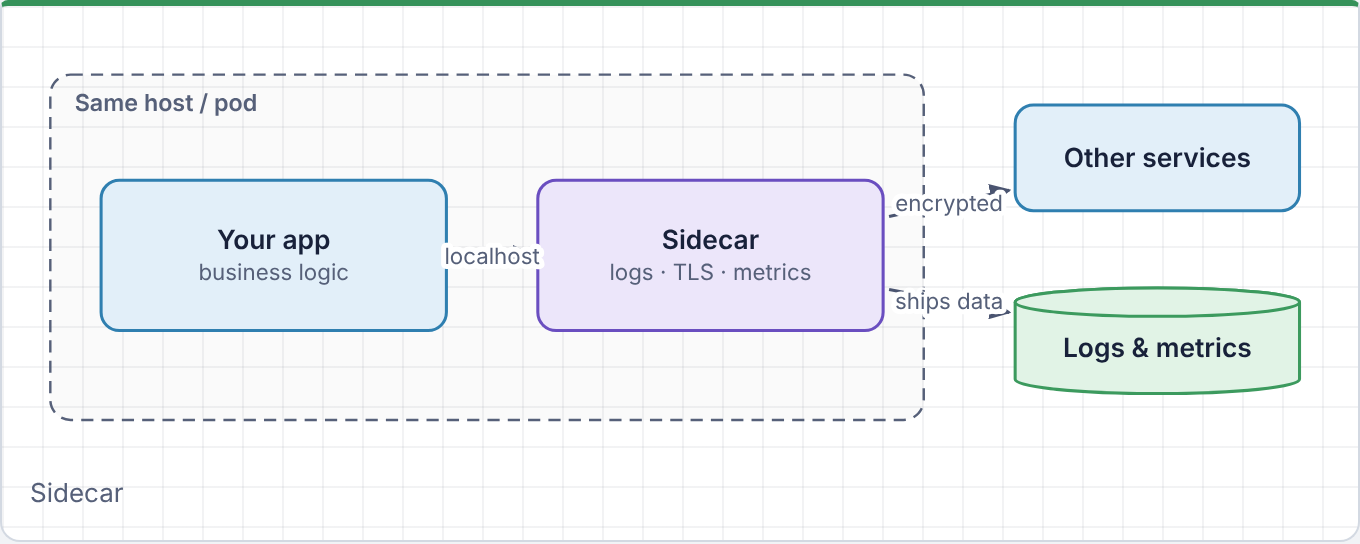
A helper process deployed right next to your app to handle infrastructure jobs.
How it works
The sidecar runs alongside the app, on the same host or in the same Kubernetes pod, and takes care of logging, metrics, TLS encryption, retries or configuration. Your app talks to it over localhost and stays focused on business logic. Service meshes like Istio and Linkerd, and Dapr, are built on this pattern.
Think of it like
A motorcycle sidecar: bolted on, travels everywhere with the bike, carries the extra load.
Use it when
Many services, possibly in different languages, that all need the same infrastructure features.
Watch out for
Extra memory and latency per instance, and more moving parts to debug.
7. Service Discovery
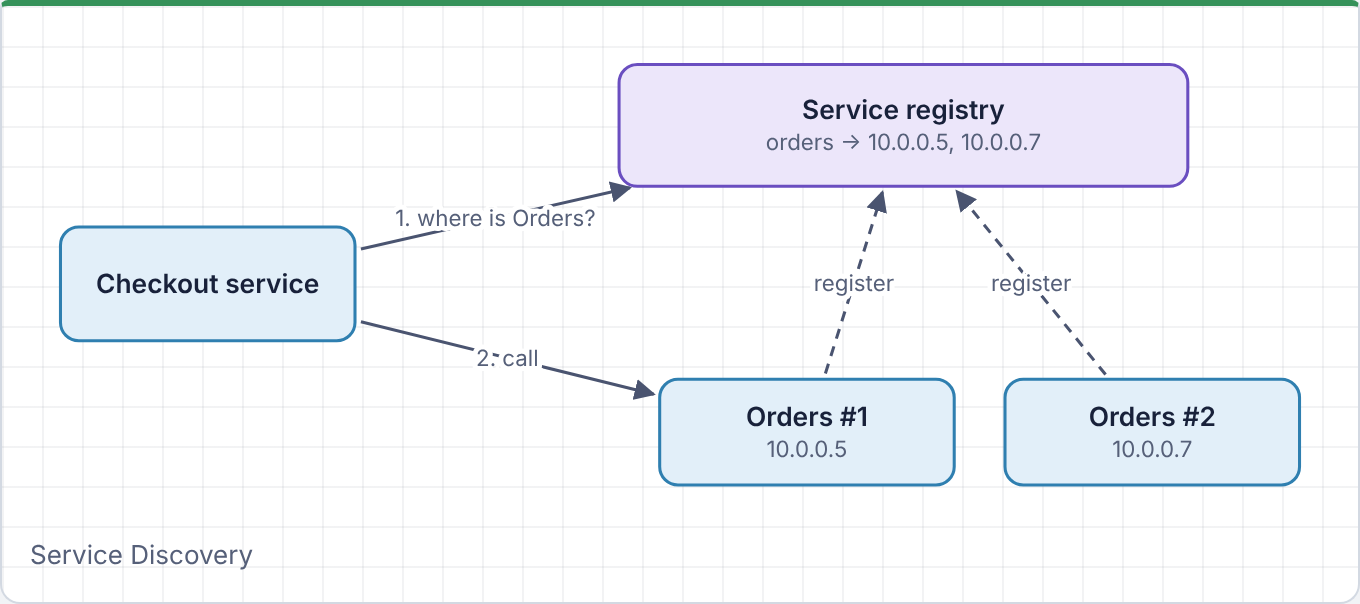
Services find each other’s current network address automatically.
How it works
In the cloud, instances start, stop and move all the time, so their addresses keep changing. Each instance registers itself in a registry such as Consul, Eureka or Kubernetes DNS. A caller asks the registry “where is Orders?” and gets the address of a healthy instance.
Think of it like
A phone directory that updates itself every time someone moves house.
Use it when
Dynamic environments with auto-scaling and many instances per service.
Watch out for
The registry must itself be highly available, and stale entries cause failed calls, so health checks matter.
8. Sharding
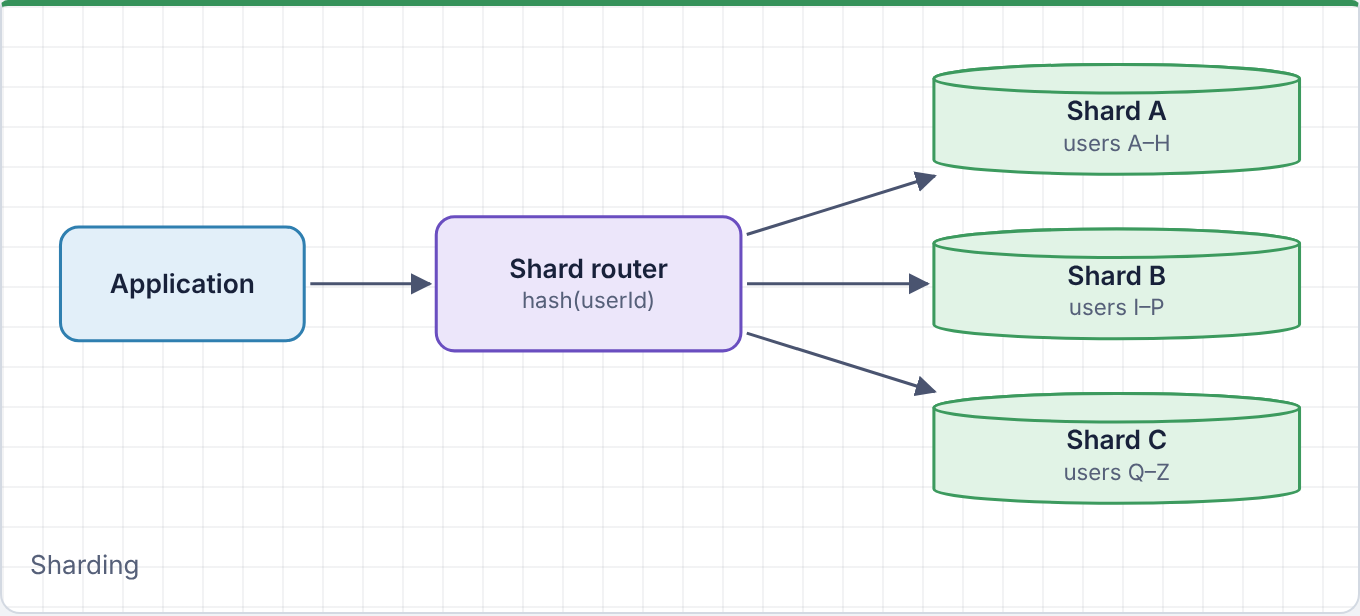
Split one big database into smaller pieces, each holding part of the data.
How it works
You choose a shard key such as userId or region. A router decides which shard holds each record, for example by hashing the key or by ranges. Each shard is a separate database on its own server, so storage and write capacity scale out horizontally.
Think of it like
A library spreading its books across buildings: authors A to H in one, I to P in another.
Use it when
When the data or the write load is too big for one database server.
Watch out for
Queries and transactions across shards are hard, a poor key creates “hot” shards, and re-sharding later is painful.
9. Replication vs Sharding
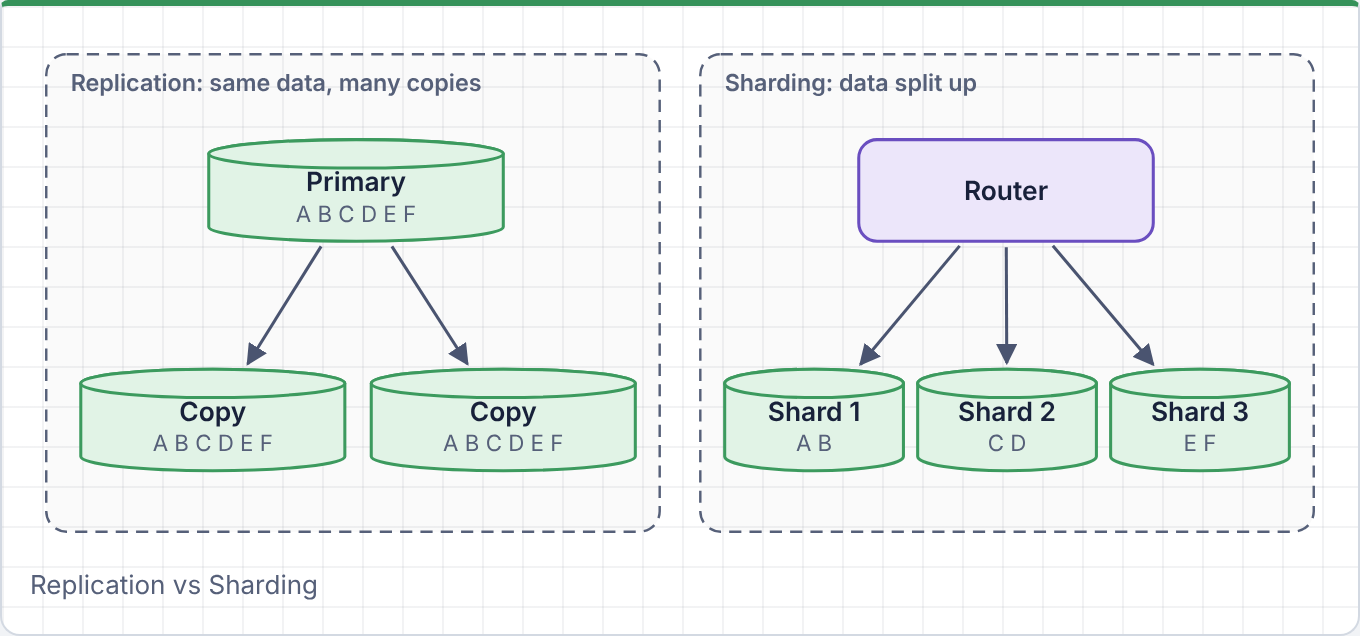
Replication copies the same data; sharding splits up different data.
How it works
With replication, every node holds all the data. That improves read capacity and availability (if one node dies, another has everything), but writes still go through one primary. With sharding, each node holds only a slice. That improves write capacity and storage, but no single node has everything. Large systems usually do both: each shard is replicated.
Think of it like
Replication is photocopying the whole book. Sharding is tearing it into chapters and handing each to a different person.
Use it when
Replicate for read scaling and resilience; shard when one machine can’t store or write all the data.
Watch out for
Mixing them up: sharding doesn’t give you backups, and replication doesn’t fix write limits.
10. When NOT to use a pattern
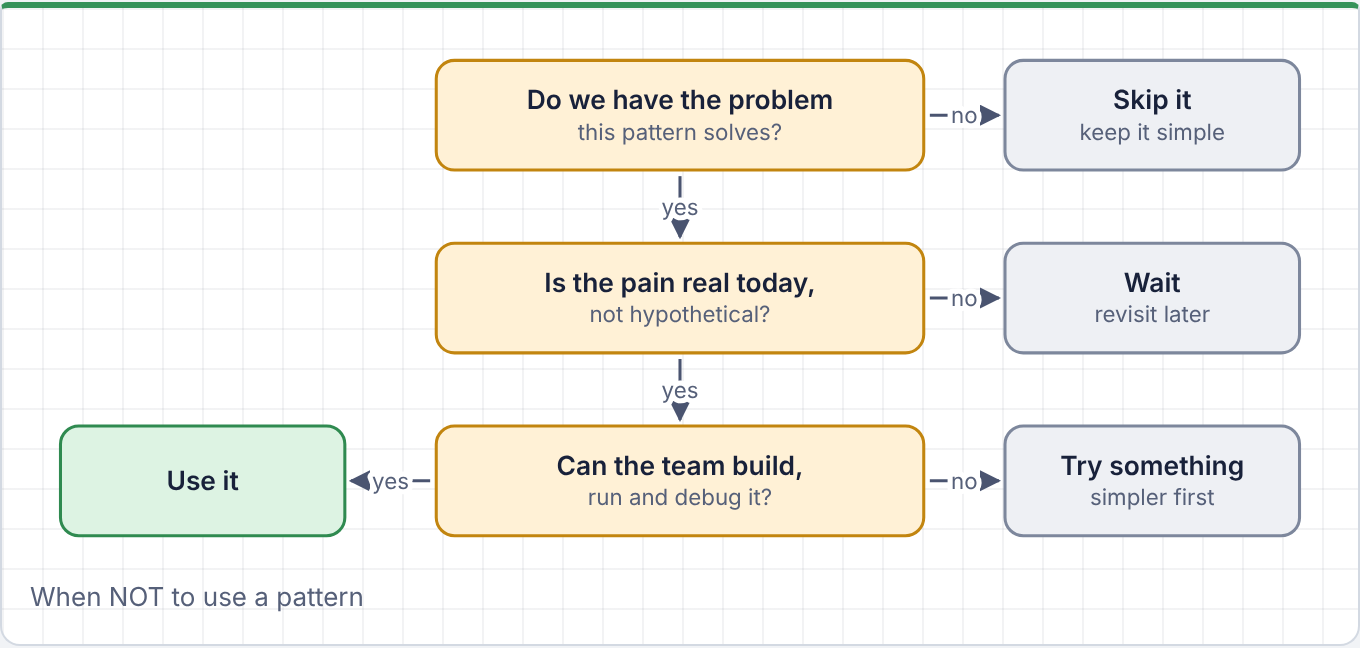
Every pattern has a cost; use one only when it solves a problem you actually have.
How it works
Patterns add code, infrastructure and mental load. Microservices for a three-person team, CQRS for a simple settings screen, or event sourcing for a to-do list create more pain than they remove. Before adopting one, ask: what problem does it solve, do we have that problem today, and can the team run and debug it?
Think of it like
You don’t buy a truck to carry your groceries home.
Use it when
Always. Knowing when to say “not yet” is the senior skill.
Watch out for
Résumé-driven development and copying big-tech architectures built for a scale you don’t have.
11. Evolution paths
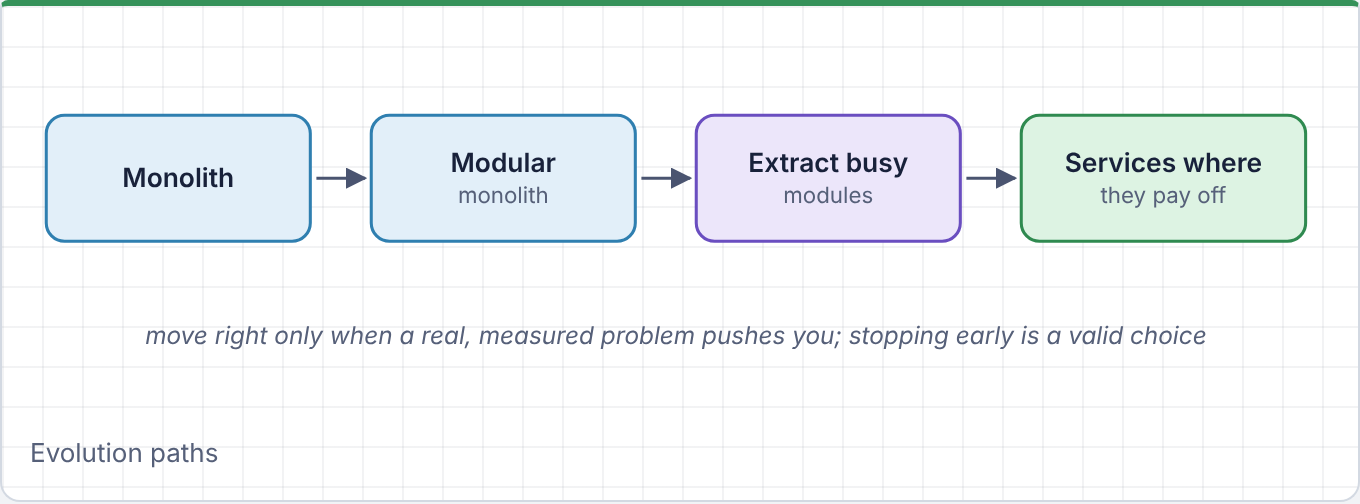
Architecture grows in steps as real needs appear, not all at once.
How it works
A healthy path: start with a monolith, enforce module boundaries to get a modular monolith, extract only the modules that truly need independent scaling or deployment, and end up with services where they pay off. Each step is driven by measured pain such as team size, load or deployment conflicts. Many systems stop at step two, and that’s fine.
Think of it like
A village becoming a city: roads get widened when traffic appears, not before.
Use it when
Planning long-term architecture and technical roadmaps.
Watch out for
Jumping straight to the end state, or never revisiting early decisions as the system grows.
Wrapping up
The patterns in this part are powerful and expensive. The senior move is rarely “add a pattern”; it’s finding the smallest change that solves the problem you can actually measure, and leaving room to evolve later.
Key takeaways
- Replace legacy systems gradually, not with a big-bang rewrite.
- Distributed transactions become sagas with explicit undo steps.
- Replication scales reads and survives failures; sharding scales writes and storage.
- Don’t follow patterns blindly: use one when it solves a problem, not when it creates complexity.
That’s the end of the series. Thanks for reading!
More on architecture & patterns
Architecture Patterns Every Developer Should Know, Part 2: Middle8 min
Architecture Patterns Every Developer Should Know5 min
Design Patterns Finally Made Sense When I Stopped Reading the Textbook4 min