Writing Architecture & patterns
Architecture Patterns Every Developer Should Know, Part 2: Middle
This is Part 2 of 3: Part 1: Junior · Part 2: Middle · Part 3: Senior
In Part 1 we looked at how a single application is structured. Once your system has more than one moving part, the questions change. How do services talk to each other without being tightly coupled? How do you keep data consistent when a message and a database write can fail separately? And what happens when the service you depend on goes down?
This part covers twelve patterns in three groups: structuring and exposing services (modular monolith, API gateway), messaging (event-driven, pub/sub, queues, outbox), and scaling and resilience (CQRS, read replicas, circuit breaker, retry, caching, idempotency).
In this part
- Modular Monolith
- API Gateway
- Event-Driven Architecture
- Publish/Subscribe
- Point-to-Point Queues
- Outbox Pattern
- CQRS
- Read Replicas
- Circuit Breaker
- Retry with Backoff
- Cache-Aside
- Idempotency
1. Modular Monolith
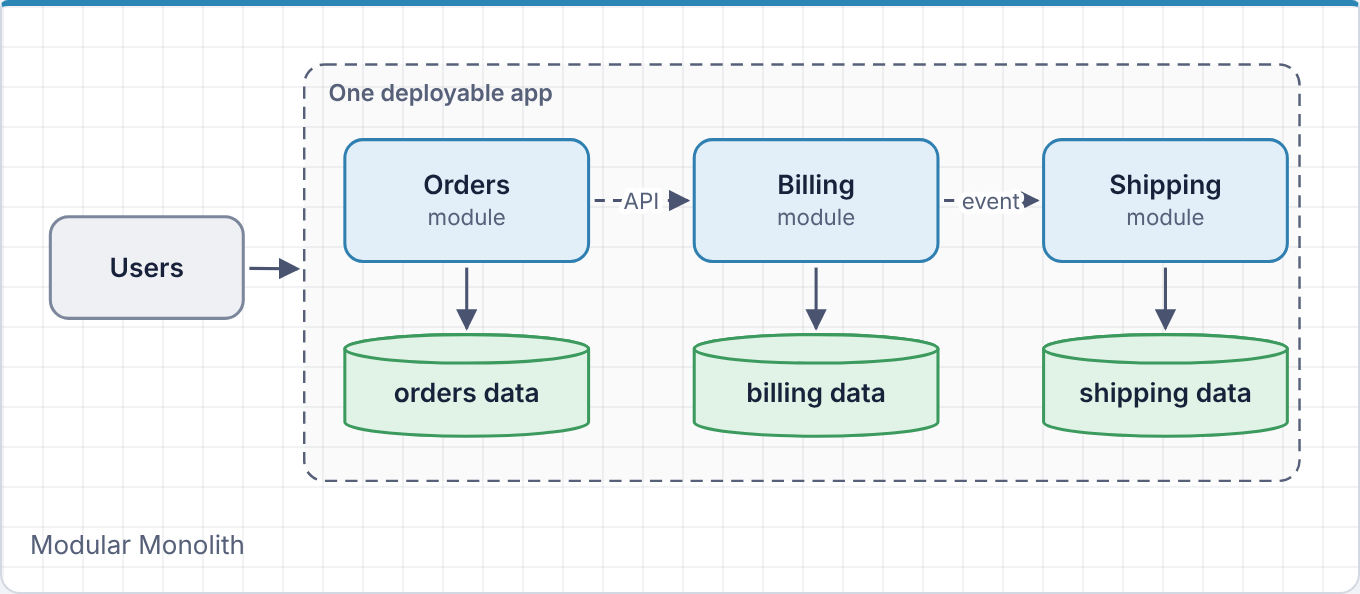
One deployable app, internally split into strongly separated modules.
How it works
Each module (Orders, Billing, Shipping) owns its code and its data and exposes a small public API. Modules can’t reach into each other’s internals or tables. You keep the easy deployment of a monolith with the clean boundaries of microservices.
Think of it like
One building with separate locked apartments: neighbours talk at the door, they don’t walk in.
Use it when
The sweet spot for most growing systems, and the natural step before (or instead of) microservices.
Watch out for
Boundaries must be enforced with project references or architecture tests, or it slowly turns back into a tangled monolith.
2. API Gateway
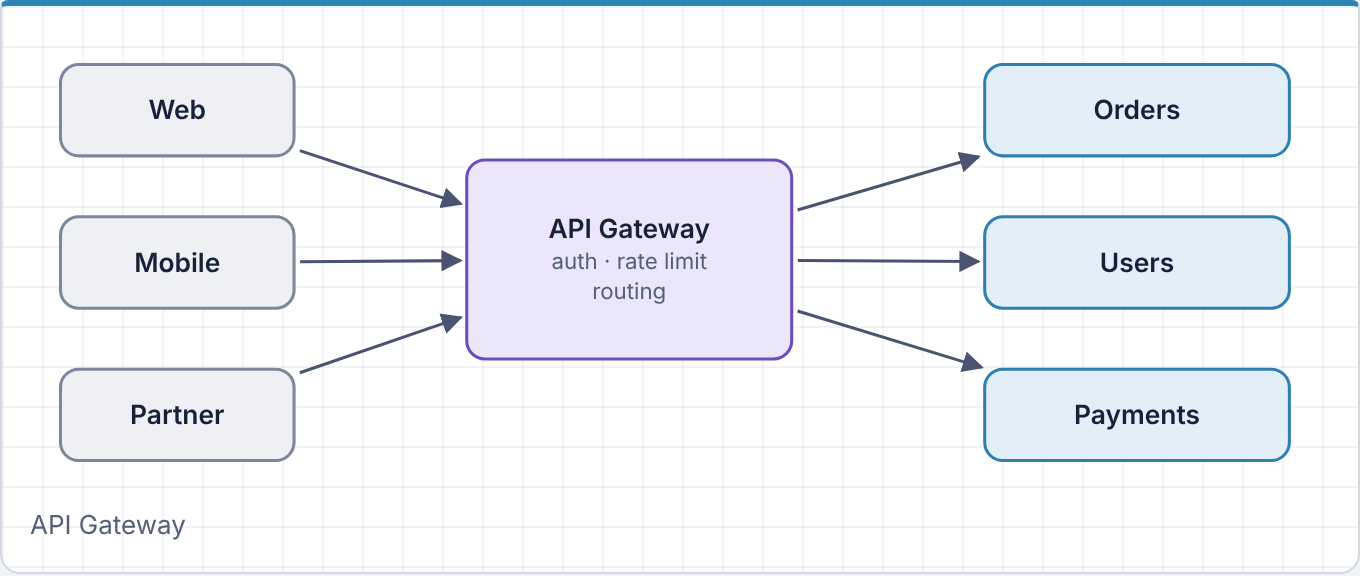
A single front door that sits in front of all your backend services.
How it works
Clients call the gateway instead of each service directly. The gateway routes each request to the right service and handles shared concerns: authentication, rate limiting, SSL, logging and sometimes combining responses. Examples include YARP, Ocelot, Kong and Azure API Management.
Think of it like
A hotel reception desk: guests talk to one desk, which forwards requests to housekeeping, the kitchen or maintenance.
Use it when
When you have several services and don’t want every client to know about all of them.
Watch out for
It can become a bottleneck or a dumping ground for business logic. Keep it thin.
3. Event-Driven Architecture
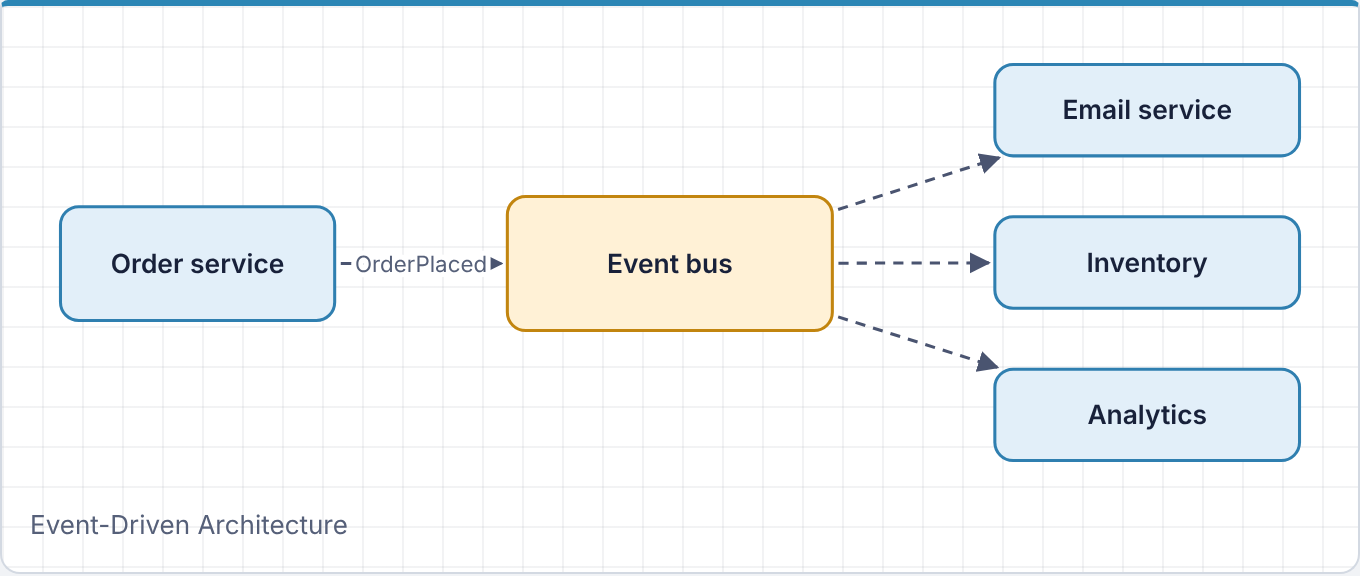
Services announce that something happened instead of calling each other directly.
How it works
A service emits an event such as “OrderPlaced” onto an event bus. Any interested service reacts in its own way and at its own pace. The sender doesn’t know who listens and doesn’t wait for them, so services stay loosely coupled.
Think of it like
A doorbell: it rings once, and whoever is home decides what to do about it.
Use it when
Workflows with many side effects (email, stock, analytics), or when services need to evolve independently.
Watch out for
Harder to trace and debug, and data becomes eventually consistent rather than instantly up to date.
4. Publish/Subscribe
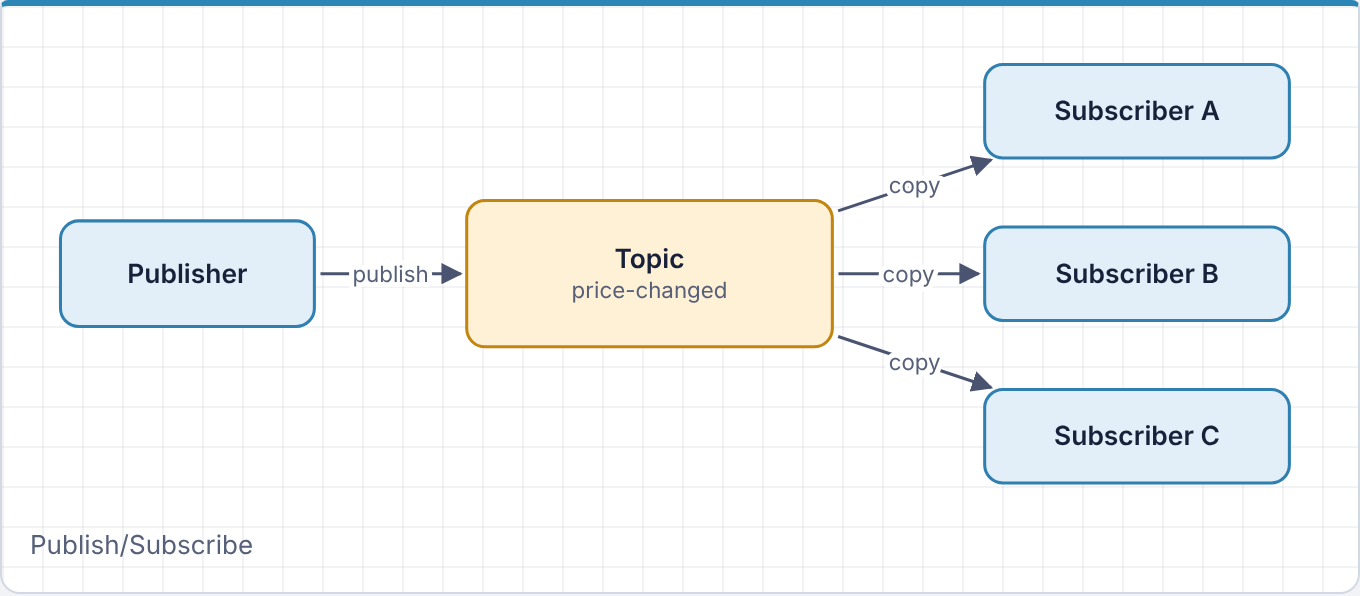
A publisher sends a message to a topic, and every subscriber gets its own copy.
How it works
Publishers don’t know who the subscribers are. A broker (a RabbitMQ exchange, Kafka topic or Azure Service Bus topic) fans each message out to every subscription. Adding a new subscriber needs no change to the publisher. This is the main plumbing behind event-driven systems.
Think of it like
A YouTube channel: upload one video and every subscriber is notified.
Use it when
One message, many independent reactions.
Watch out for
Subscribers must cope with duplicate and out-of-order messages.
5. Point-to-Point Queues
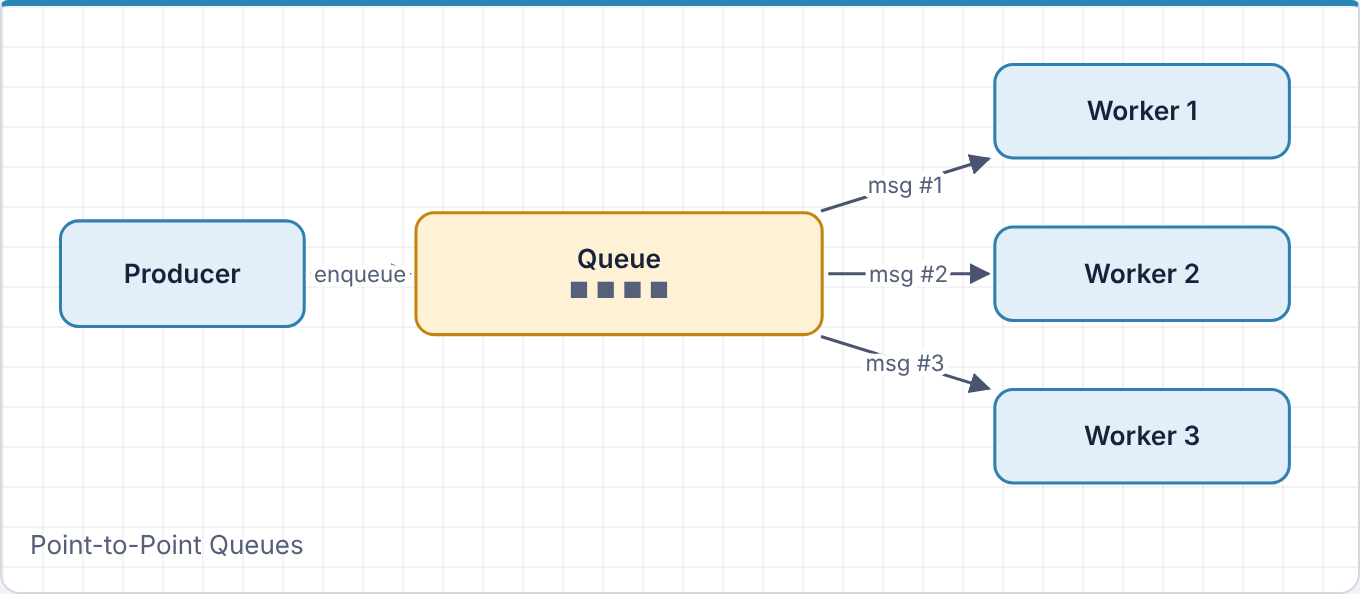
Messages wait in a queue and each one is handled by exactly one consumer.
How it works
Producers push work items into a queue. Several workers compete for messages, and once one worker takes a message nobody else sees it. The queue absorbs traffic spikes, and you scale by adding workers.
Think of it like
A deli ticket machine: each ticket is served by exactly one clerk, whoever is free next.
Use it when
Background jobs: sending emails, generating PDFs, processing payments or imports.
Watch out for
You need dead-letter queues for messages that keep failing, and handlers that tolerate retries.
6. Outbox Pattern
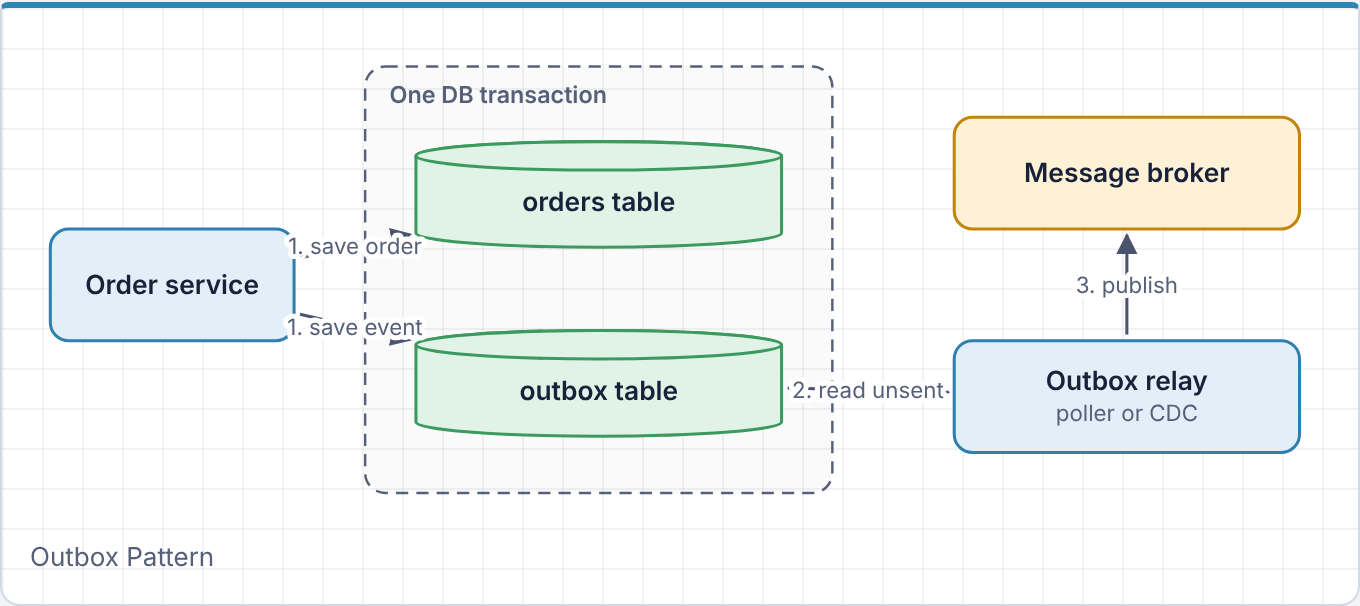
Save the data and the event in the same transaction, then publish the event afterwards.
How it works
Saving an order to the database and publishing “OrderPlaced” to a broker are two separate operations, so one can succeed while the other fails. The fix: in one database transaction, write the order and an event row into an outbox table. A background relay reads unsent rows, publishes them, and marks them as sent.
Think of it like
Writing a letter and dropping it in your outbox tray; the mail carrier reliably collects it later.
Use it when
Any time a database change must reliably produce a message.
Watch out for
A message can be published more than once, so consumers must be idempotent.
7. CQRS
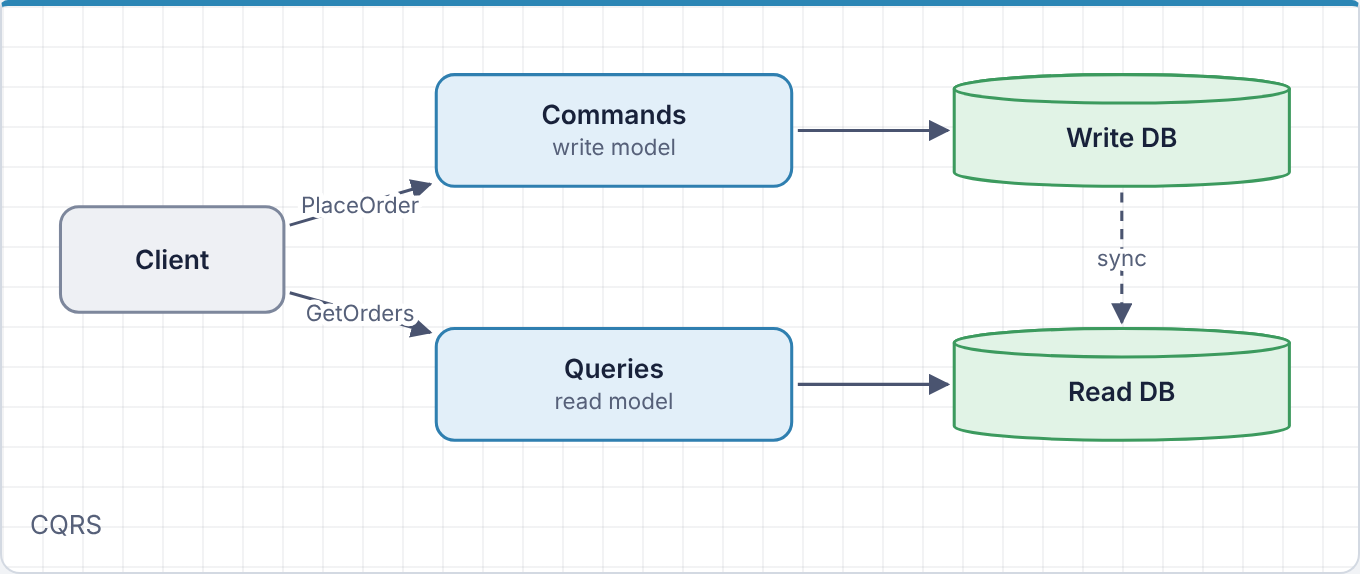
Use one model to change data (commands) and a separate model to read it (queries).
How it works
Commands like PlaceOrder go through validation and business rules into the write model. Queries like GetOrders read from a model shaped exactly for the screen, sometimes even a separate read database kept in sync. Each side can be optimized and scaled on its own. The name means Command Query Responsibility Segregation.
Think of it like
A library: the back office catalogs books carefully, while the front desk just looks things up fast.
Use it when
Complex domains, or when reads and writes have very different shapes and loads.
Watch out for
More moving parts. With separate databases, reads can be slightly behind writes.
8. Read Replicas
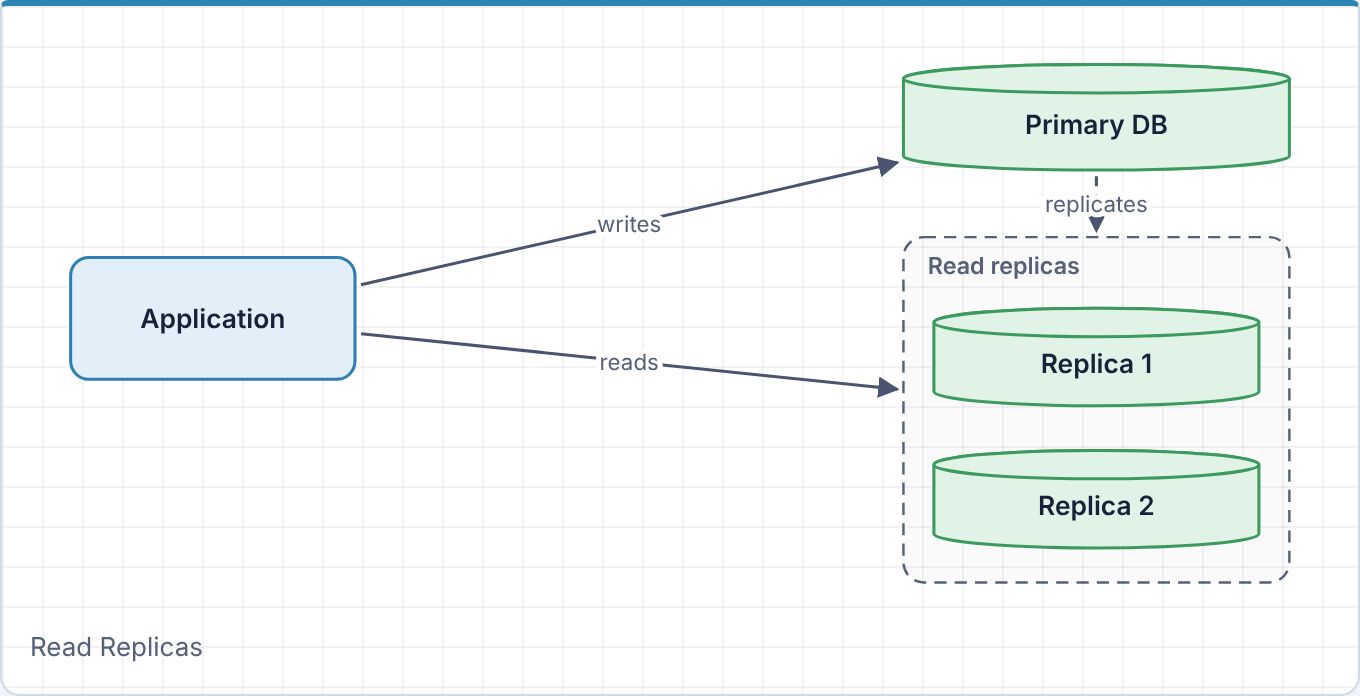
Copies of the main database that serve read traffic.
How it works
All writes go to the primary database. The primary continuously copies its changes to one or more replicas. The application sends read queries to the replicas, which takes load off the primary.
Think of it like
One original document and several photocopies that many people can read at once.
Use it when
Read-heavy systems: catalogs, dashboards, reports, feeds.
Watch out for
Replication lag: a user may not immediately see what they just saved. Read your own fresh writes from the primary.
9. Circuit Breaker
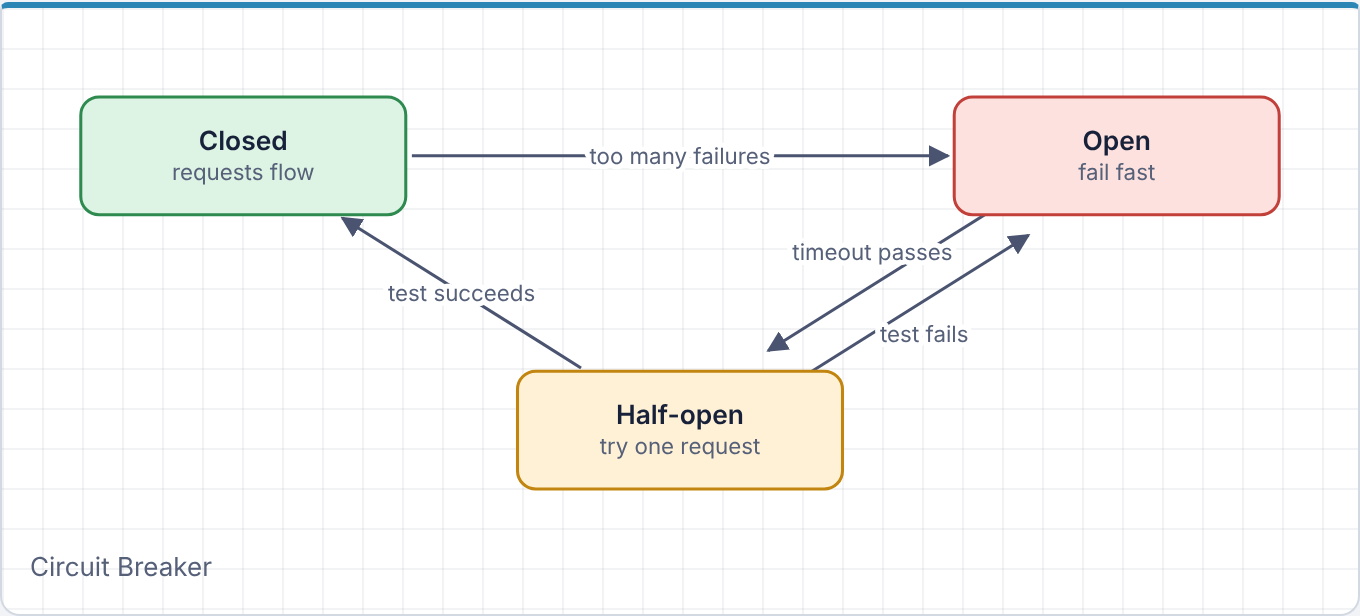
Stop calling a failing service for a while so the failure doesn’t spread.
How it works
A breaker wraps calls to another service. Closed: calls flow normally while failures are counted. Open: after too many failures, calls fail instantly without touching the sick service. Half-open: after a timeout, one test call is allowed; success closes the breaker, failure opens it again. In .NET, Polly provides this.
Think of it like
The breaker in your home’s fuse box: it trips to protect the rest of the house.
Use it when
Calls to any dependency that can go down or become slow.
Watch out for
Thresholds need tuning, and you need a sensible fallback while the circuit is open.
10. Retry with Backoff
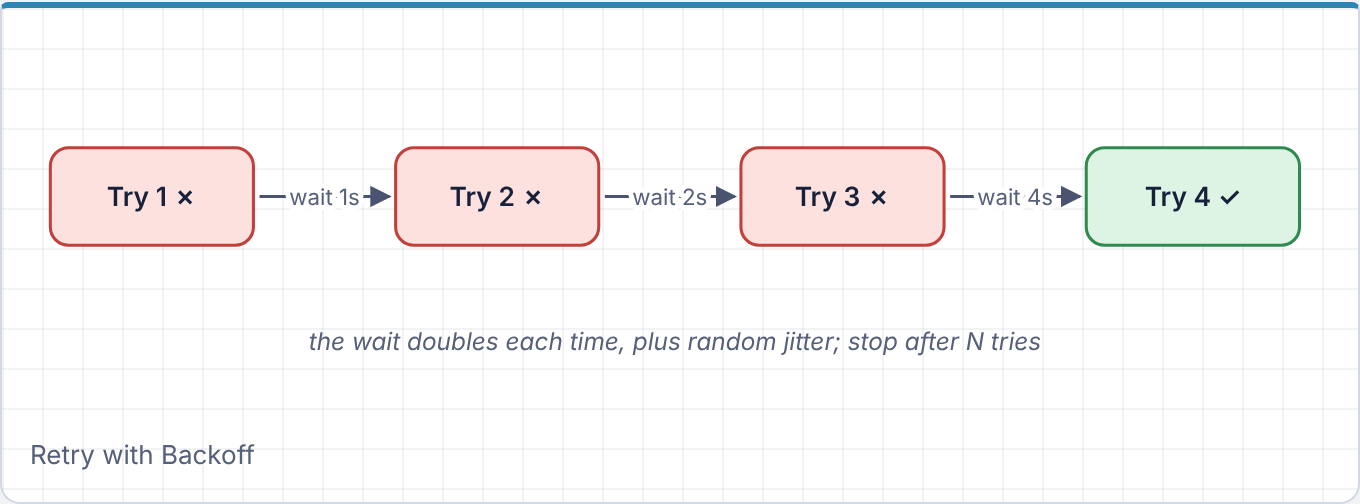
Retry a failed call, waiting a bit longer before each new attempt.
How it works
Many failures are temporary: a network blip, a brief overload. So you retry, but wait 1s, then 2s, then 4s (exponential backoff), plus a little randomness called jitter so that thousands of clients don’t all retry at the same instant. After a fixed number of attempts you give up.
Think of it like
Calling a busy friend: you try again in a minute, then in five, not every second.
Use it when
Transient errors: timeouts, 503 Service Unavailable, database deadlocks.
Watch out for
Only retry operations that are safe to repeat. Don’t retry errors like 400 Bad Request. Combine with a circuit breaker.
11. Cache-Aside
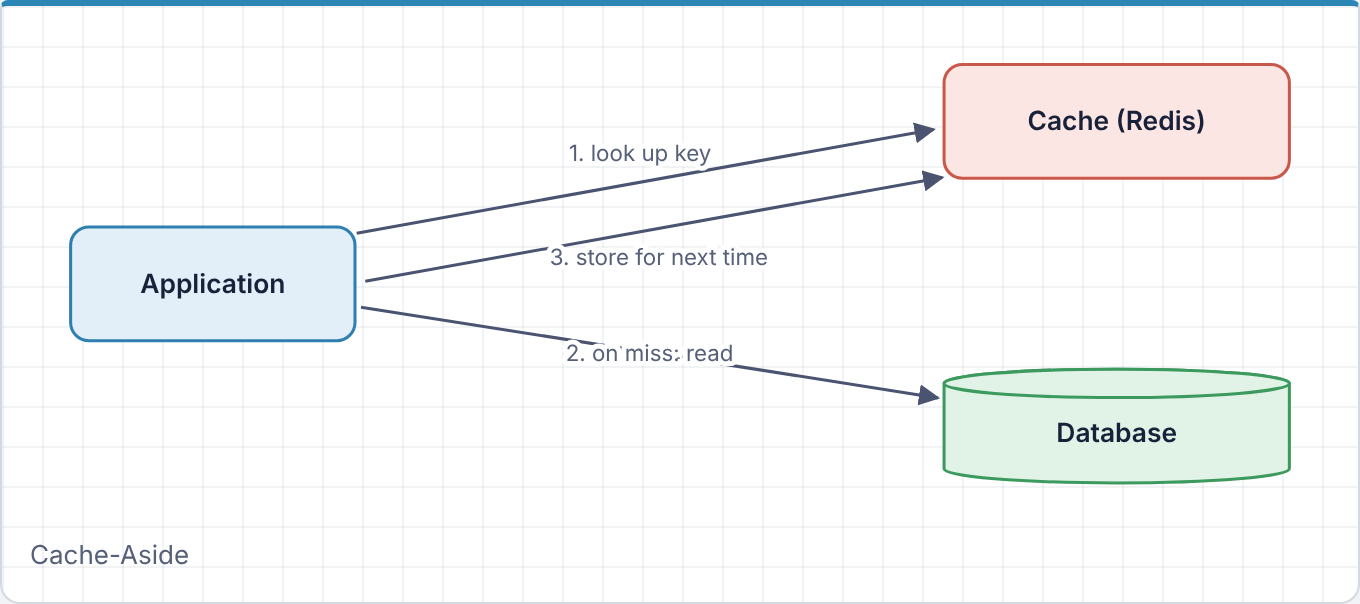
Check the cache first and only go to the database on a miss.
How it works
Look up the key in the cache (for example Redis). If it’s there (a hit), return it. If not (a miss), read from the database, store the value in the cache with an expiry, and return it. When data changes, update the database and remove the cached entry.
Think of it like
Keeping your favourite snacks on your desk instead of walking to the kitchen every time.
Use it when
Data that’s read often and changes rarely: product details, settings, profiles.
Watch out for
Stale data and cache invalidation. Many simultaneous misses can stampede the database.
12. Idempotency
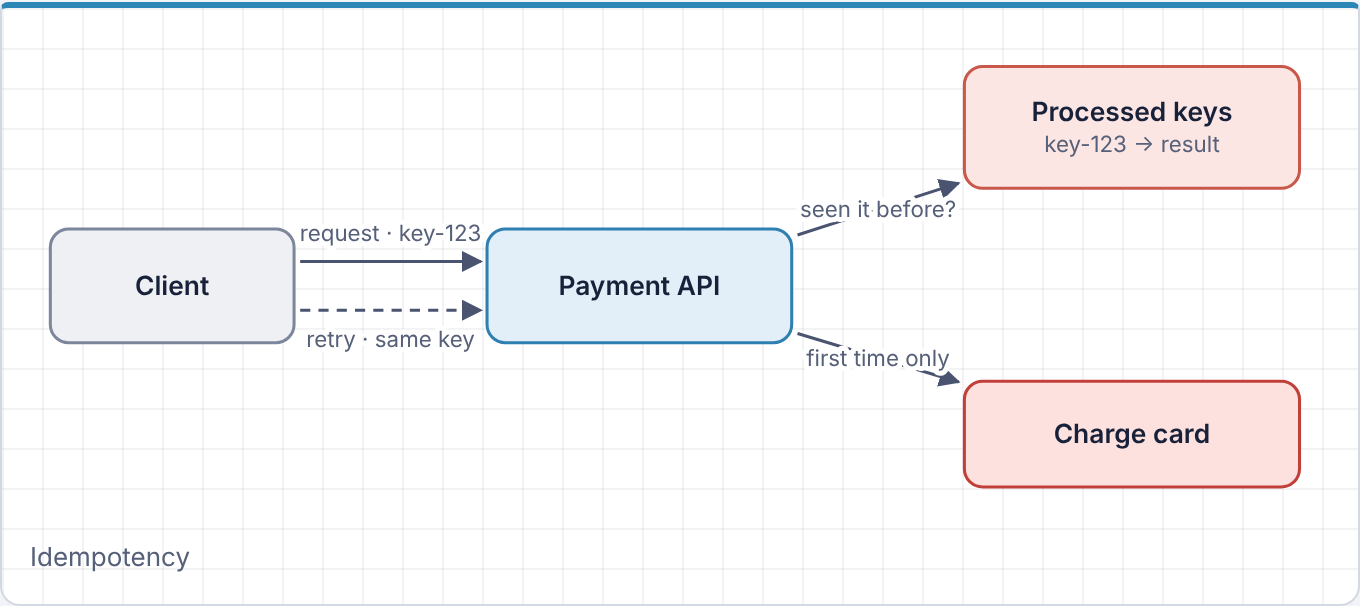
Doing the same operation twice has the same effect as doing it once.
How it works
Networks fail, clients retry and messages get delivered twice. The client sends a unique Idempotency-Key with the request. The server remembers keys it has already processed; if a key shows up again, it returns the saved result instead of charging the card a second time.
Think of it like
A lift button: pressing it five times still calls the lift only once.
Use it when
Payments, order creation, message consumers: anywhere a retry can happen.
Watch out for
Keys need storage and an expiry, and the “check then save” step must be atomic.
Wrapping up
The common thread here is that networks are unreliable and load is uneven. Messaging decouples services in time, and resilience patterns make sure one failure doesn’t cascade into an outage. Notice how often they lean on each other: outbox needs idempotent consumers, retries need circuit breakers.
Key takeaways
- A modular monolith gives you clean boundaries without the cost of distribution.
- Pub/sub delivers each message to every subscriber; a queue delivers it to exactly one worker.
- Use the outbox pattern whenever a database change must reliably produce a message.
- Retries without idempotency cause duplicates; retries without circuit breakers cause pile-ups.
Next up: Part 3, trade-offs and consequences.
More on architecture & patterns
Architecture Patterns Every Developer Should Know, Part 3: Senior8 min
Architecture Patterns Every Developer Should Know5 min
Design Patterns Finally Made Sense When I Stopped Reading the Textbook4 min